Open → Snapshot
Start, continue or find the right unit, then see the current architecture before editing the detail.
 ARCProfessional Intelligence
ARC connects curriculum, assessment, teaching, evidence and adaptation in one professional workflow—doing the organisational lifting while preserving the judgement that makes teaching intelligent.
ARC does the lifting around retrieval, organisation, alignment and production. The teacher remains responsible for the intellectual work of selecting, interpreting and deciding.
ARC is not a collection of disconnected generators. Curriculum intent, assessment, learning design, evidence, SRL, adaptive response and usable outputs sit inside one coherent professional workflow.
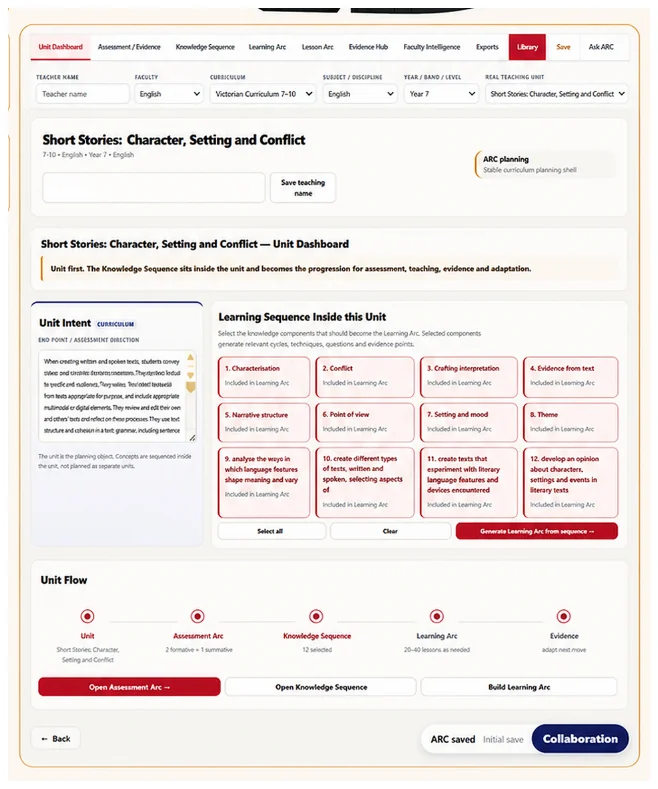
Start, continue or find the right unit, then see the current architecture before editing the detail.
Define quality, sequence knowledge, shape learning cycles and deliberately select self-regulated learning opportunities.
Turn the cycle into lesson-sized teaching decisions while carrying intent, evidence and SRL forward.
Use evidence to change the next move and plan different routes to the same intended learning.
Make the thinking usable, traceable and available for professional learning, assurance and implementation.
The new Companion Guide mirrors the live platform from My ARC through Snapshot, Assessment/Evidence, Knowledge, Learning, SRL, Lesson, Adaptation, Pathways, Resources, Evidence Hub, Faculty Intelligence and Exports.
Recommendations surface for professional consideration. Teachers decide what is implemented.
Lesson companions, plans, rubrics and resources remain editable rather than permanently linked to generated text.
ARC produces documents for approved school storage rather than becoming a student information repository.
Choose curriculum coherence, assessment design, adaptive teaching, SRL, resource development or faculty leadership. The demonstration can then follow that workflow rather than presenting a generic feature tour.
Lesson generation is an output. The core product is the professional intelligence architecture beneath it: curriculum coherence, assessment reasoning, evidence, adaptive response, SRL and the visibility of teacher judgement.